Configuring Traffic Server
Traffic Server provides several options for configuring the system.
Configure Traffic Server Using Traffic Line
Traffic Line enables you to quickly and easily change your Traffic Server configuration via command-line interface.
View Configuration Options in Traffic Line
To view a configuration setting, enter the following command:
traffic_ctl config get VARIABLE
where var is the variable associated with the configuration option. For a list of variables, refer to 配置变量.
Change Configuration Options in Traffic Line
To change the value of a configuration setting, enter the following command:
traffic_config set VARIABLE VALUE
where var is the variable associated with the configuration option and value is the value you want to use. For a list of the variables, see 配置变量.
Configure Traffic Server Using Configuration Files
As an alternative to using Traffic Line, you can change
Traffic Server configuration options by manually editing specific
variables in records.config.
Traffic Server must reread the configuration files for any changes to take effect.
This is done with traffic_ctl config reload. Some configuration changes require a
full restart of Traffic Server.
The following is a sample portion of records.config:
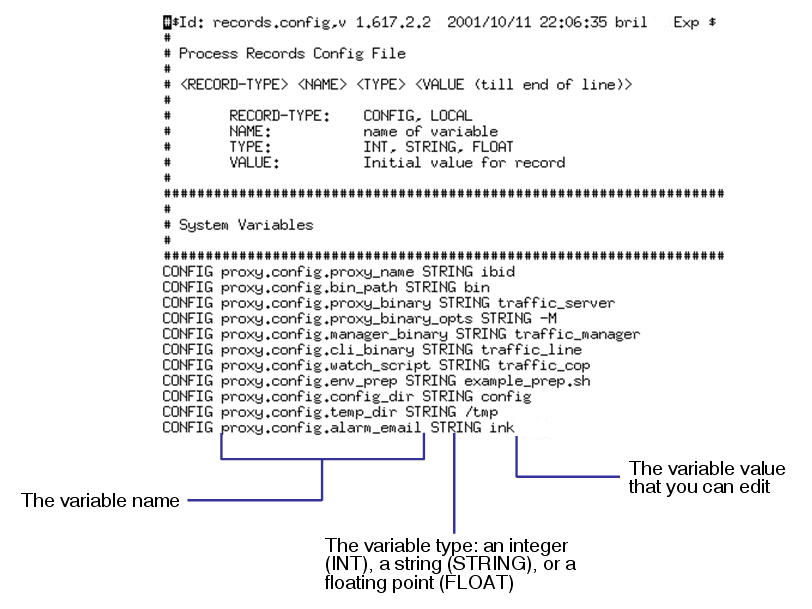
Sample records.config file
In addition to records.config,
Traffic Server provides other configuration files that are used to
configure specific features. You can manually edit all configuration
files as described in Configuration Files.